
Meta launched Muse on September 8, 2026, and within a month TIME reported more than 5 million downloads and the No. 1 spot in the U.S. App Store. If you run a business and post about it, the practical question is what the Meta Muse AI agent can do for your social accounts today.
Muse is a strong generalist that handles email, travel, shopping and bookkeeping questions, with social media as one job on a long list. To see how that plays out, the Stanley team asked Muse to come up with, write and schedule a Facebook post, then ran a matching brief through Stanley, the AI Head of Content built by the team at Stan.
Muse completed the brief, scheduling included, and the gaps showed up in the facts, the platform coverage and the month of posts that followed.
Key Takeaways
Meta Muse is a free personal AI agent, powered by the Meta Muse Spark model, that connects to Instagram professional accounts, Facebook Pages, Meta ad accounts and tools like Canva and Shopify.
For social media, Muse AI can research a topic, write a post in several angles, schedule it from the chat and answer analytics questions about your Meta accounts.
In a hands-on test, Muse wrote three Facebook drafts and scheduled one for 5pm, and the draft carried an audit statistic the prompt had not supplied.
Meta has announced no native LinkedIn or X integration, which leaves a gap for founders who post on those two networks.
Stanley covers the full posting loop on LinkedIn, X, Instagram and Threads, from the first idea to a dated calendar slot and impressions data afterward.
Try Stanley free for 14 days and hand it the same brief you would give Muse.
What Is Meta Muse? The Meta Muse AI Agent Explained
Muse is a personal AI agent from Meta that takes actions for you as well as answering questions. In Meta’s launch announcement, the company describes an agent that “actually does the work,” from sending an email to booking travel.
Each account runs on a dedicated cloud computer with its own browser, and a separate Sentinel agent has to approve anything Muse sends to the internet, according to Meta’s safety write-up.
The model underneath is Meta Muse Spark. You talk to the agent in the Meta Muse app on iOS and Android, on the web at muse.ai or inside WhatsApp, and it’s available in the U.S. and Canada.
Muse by Meta is a separate product from Meta AI, the free assistant inside Meta’s apps. Meta AI answers questions where you already are, while the Meta Muse agent works across your connected accounts in the background.
Meta Muse Pricing and the Muse App Plans
Meta says Muse is “free for most of what people need,” and its Muse subscriptions page covers two paid tiers measured in weekly usage.
Free: $0, with a usage limit that refreshes. Meta doesn’t publish its size.
Power: $20 a month for 500 million Muse tokens a week.
Max: $100 a month for 3 billion Muse tokens a week.
Muse for Small Business
On September 29, Meta added Muse for Small Business, a set of skills and connectors for owners. In its second announcement, Meta says Muse can connect Instagram professional account analytics, Facebook Pages and Meta ad accounts “in a few clicks,” along with Canva, Shopify, Slack, Notion and QuickBooks.
Muse from Meta is built for that kind of owner, someone with an entire business to run and social media as one task among many.
What Meta Muse AI Can Do for Social Media
For social media, the Meta Muse AI agent covers more of the job than most general assistants. It researches, drafts, schedules and reports, all from one chat.
Social Media Job
What Muse Can Do
Where This Comes From
Research
Opens its own browser, reads pages and keeps watching them
Meta’s launch announcement
Drafting
Writes a post in several angles and recommends one
Stanley team test
Scheduling
Schedules a post from the chat and saves it to a Scheduled list
Stanley team test
Meta Analytics
Connects Instagram analytics, Facebook Pages and Meta ad accounts
Meta’s second announcement
Campaign Planning
Reviews what’s working and drafts next week’s campaign
Meta’s suggested prompts
Design Handoff
Pulls in Canva templates through the Canva connector
Meta’s second announcement
Approvals
Holds anything that would publish, send or spend until you approve
Meta’s second announcement
That’s a real head start if most of your activity sits on Instagram and Facebook. Meta also states that “nothing publishes, sends, or spends without your approval,” which keeps a person in charge of what goes out.
What Early Meta Muse Reviews Say
Early reviews describe a capable agent that people mostly use for life admin. ABC News collected examples of users having Muse cancel forgotten subscriptions and negotiate a lower internet bill.
On TechCrunch’s Equity podcast, reporter Sean O’Kane called his own use, finding unclaimed funds, a “party-trick type thing.” He doubted that people will trust an ad-funded company with their financial data.
What Reddit Users Say About the Muse AI Agent
Reddit splits along the same line, with praise for the product and suspicion of the company behind it.
Convenience: In a reddit thread, one user called Muse “the best right now for 99% of people” who “want stuff done.”
Positioning: In a thread asking what Muse does that other platforms can’t, a reviewer called it “the first big one being positioned as a personal assistant that handles workflows rather than being a chatbot.”
Daily Use: In an Artificial Intelligence thread, another wrote, “it helps remind me of appointments and I use it to help with drafting emails.”
Trust: Doubt about handing data to Meta runs through every thread.
One pattern stands out for anyone weighing Muse as an AI agent for social media. Commenters described reminders, shopping, playlists and bills, and none described running their posting through it.
Meta Muse Review: Testing the Muse AI Agent on a Facebook Post
The Stanley team opened Muse on the web, left it in Instant mode and typed one request. The prompt read, “Can you ideate, write, draft, and schedule a Facebook post for me about the importance of sound SEO for AI Visibility.”
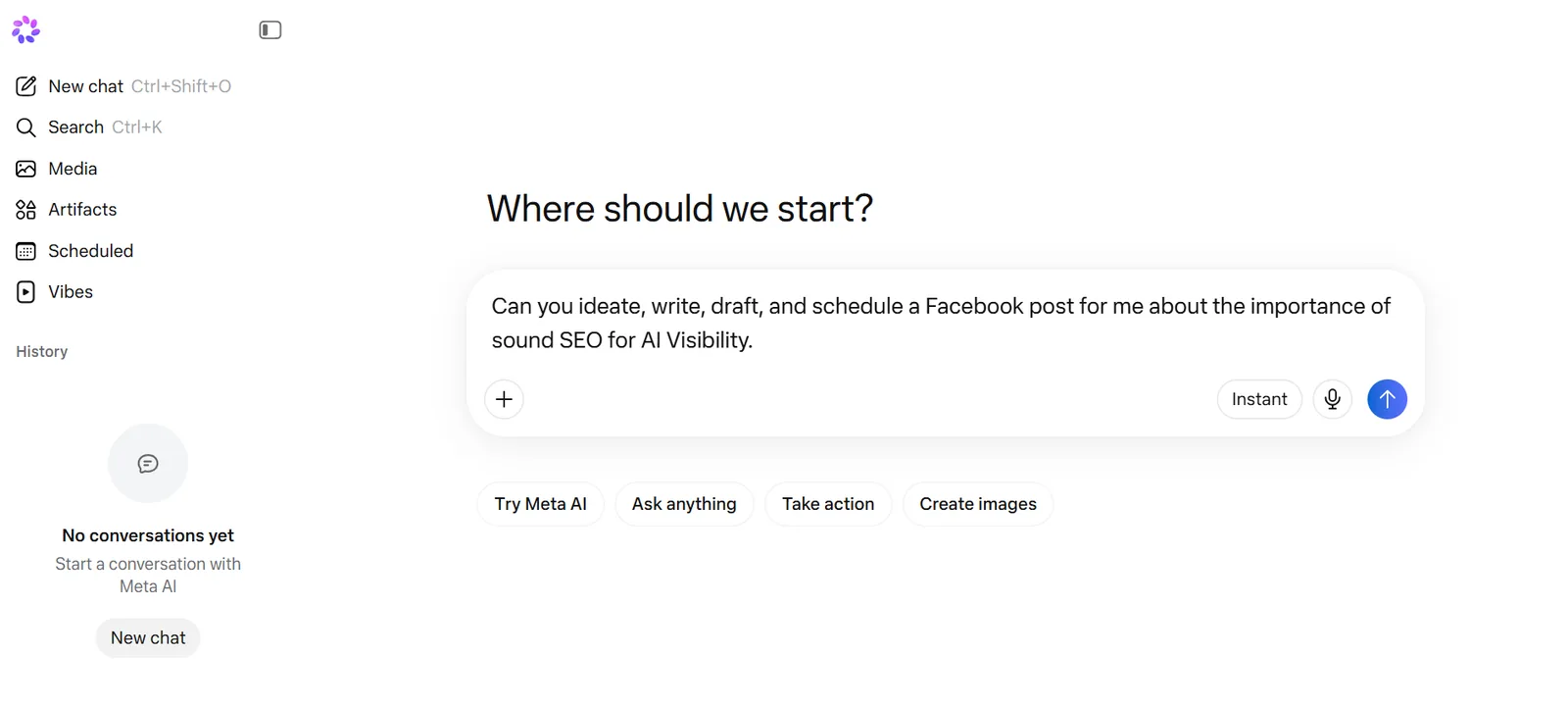
The Stanley team’s brief to Muse, covering the idea, the writing and the scheduling in one sentence.
Muse Wrote Three Drafts in One Reply
Muse came back with three versions labelled by angle, including “The straight talker” and “Shorter, punchier.” It also recommended one, which is more than many AI tools for social media do, saying Draft 1 “positions you as the expert calling out the hype.”

Muse’s first two drafts. Draft 1 mentions an audit of 50 brands that did not come from the prompt.
The structure of Draft 1 was sound, with a hook, a short list and a closing question. Two things would need editing before a founder could post it under their own name.
An Invented Statistic: The draft says, “We just audited 50 brands that are invisible in AI Overviews. 90% had the same problem.” The prompt contained no audit and no numbers, so the claim came from Muse.
Stock Phrasing: The second line is “Here’s the truth,” followed by an argument any marketing account could publish. Nothing draws on the poster’s own work or customers.
The statistic deserves the most care, because an audit that didn’t happen becomes a problem the first time a customer asks to see it.
Muse Scheduled the Facebook Post From the Chat
After the team chose Draft 1, Muse offered three time slots and recommended “Today at 5pm.” It then confirmed, “Done. Scheduled for Today at 5:00 PM EDT,” and said it would also “ping you at 5pm with it so you don’t miss it.”

Muse’s confirmation, with the final copy and a card named Post SEO for AI Visibility.
Muse completed the whole brief in one conversation, which is a strong result for a free general agent. The scheduled post then appeared in Muse’s Scheduled tab, in one list with suggested tasks such as a daily workout and a trivia quiz.

Muse’s Scheduled tab. The Facebook post is one item among daily briefings, workouts and quizzes.
Scheduling runs through Muse’s scheduled tasks feature, which Meta covers in a help article. One list works well for a single post, and it gets harder to manage once fifteen posts across three networks are due in a month.
Where the Muse AI Agent Stops Short as an AI Social Media Manager
Muse treats social media as one task among dozens, and that shows in four places.
LinkedIn and X: Meta’s announced connectors cover its own apps plus tools like Canva, Shopify and Slack. LinkedIn and X aren’t on the list, and those are where many B2B founders and consultants post most.
A Calendar for Your Posts: Muse stores a scheduled post in a general task list. The test surfaced no month view showing which post goes out on which network.
Your Own Material: Muse drafted from a one-line prompt and filled the gap with a statistic. A tool built for founders starts from your voice notes, meetings and past posts.
The Feedback Loop: Knowing which topics earned replies last month, and writing the next post from that, is where most of the ongoing work sits.
Muse supports custom connectors for technical users, though setup takes time. Most people already have an AI that can write a caption, and what they’re missing is the planning and follow-through that define an AI social media manager.
What the Data Says About AI Tools for Social Media
Independent research backs up both sides of the comparison.
Finding
Source
What It Means for You
71% of U.S. adults use Facebook and 50% use Instagram
Pew Research Center, 5,022 adults
Muse’s strength on Meta’s apps covers a very large audience.
58% of small businesses use generative AI, up from 23% in 2023
U.S. Chamber of Commerce, 2025
Owners are ready for an agent like Muse.
72% of creators have used AI, yet 4% use it for strategy
CreatorIQ survey of 5,095 creators
Most AI use still stops at writing the words.
45% of 2,700 AI answers to news questions had a significant issue
European Broadcasting Union and BBC, via Al Jazeera
Check every figure in an AI draft before you post it.
53% of consumers are less likely to buy from brands they know use AI in social content
Clutch survey of 601 consumers
Posts need to read like a person with real experience wrote them.
The draft is the part AI already handles, while accuracy, rhythm and the right networks decide whether posting pays off.
Meta Muse vs Stanley: A Generalist AI Agent and a Specialist AI Social Media Agent
Muse helps you run your life and your business, while Stanley runs the part of your business that posts. The two overlap on drafting and scheduling and part ways on most of what surrounds them.
Built For
Everyday life and business tasks
Founders and operators growing an audience
Learns Your Context
From connected apps and conversations
From past posts, voice notes, meetings and newsletters
Drafts Posts
Yes, from a prompt
Yes, from your own material
Scheduling
Yes, from the chat, saved to a Scheduled list
Yes, a date and time per post
Content Calendar
None surfaced in the test
Month, week and three-day views
No native connector announced
Yes
X
No native connector announced
Yes, including Auto-DMs
Yes, professional account analytics
Yes
Facebook Pages
Yes
Outside its core networks
Meta Ads
Yes
No
General Business Tasks
Email, travel, shopping and bookkeeping
Outside its scope
Starting Price
Free, then $20 or $100 a month
$49 a month after a 14-day free trial
Muse wins on breadth and price. Stanley wins the rows about publishing on LinkedIn and X, which a founder with an audience to grow will feel each week.
The Same Brief on Stanley’s Ideate Screen
The Stanley team gave Stanley a matching request, “Help me write a post for LinkedIn about the importance of solid SEO for AI visibility.” LinkedIn was swapped in because that’s where most Stanley users publish.

Stanley’s Ideate screen. The sidebar follows the whole job, from Ideate and Write to the Content Calendar and Insights.
The draft took a position and explained it. It opens with “The industry is currently obsessing over new acronyms as if they replace search fundamentals,” then walks through how a crawler has to find and index a page before any model can cite it.

Stanley’s draft.
Scheduling Puts a Date on a LinkedIn Post
A Schedule button under every Stanley draft opens a date picker and a time field, with Schedule Post and Publish Now as the two choices. Stan’s own Meet Stanley guide says Stanley will not post anything on your behalf without your oversight.

Scheduling from the draft. You pick the day and time, then choose Schedule Post or Publish Now.
Once scheduled, the post appears on the Content Calendar. In the team’s account, October showed eight LinkedIn posts lined up across seven days, and the queue read zero because every draft already had a slot.

Stanley’s Content Calendar, with eight LinkedIn posts dated across two weeks and an empty queue.
A month on one screen shows the empty days at a glance, which Muse’s task list doesn’t offer.
Stanley Connects to the Places Founders Publish and Work
Stanley’s core connections are iMessage and SMS, X, LinkedIn, Threads, Instagram and YouTube. Meeting notes come in from Granola, Fathom, Fireflies and Wispr Flow, alongside Substack and Kit newsletters, Slack and Notion.

Stanley’s integrations, where social accounts sit beside meeting recorders and newsletters.
That list is the fix for the invented statistic. When Tuesday’s customer call is already in the system, the draft can quote what the customer said.
Insights and Auto-DMs Cover What Happens After You Post
The Insights tab for the connected LinkedIn account showed 18,519 impressions over the past year and 2.7k in the last 30 days. On the Locked In plan, Stanley turns that data into a weekly review of what worked and what to post next.

Stanley’s Insights tab, with a year of impressions by day above a 30-day growth chart.
Stanley also handles some of the replies. With Auto-DMs, you write one direct message, attach it to your posts on X and set an optional keyword such as “LINK”, and each person who replies with that word receives it. Auto-DMs run on X only, so LinkedIn messages stay manual.
What Stanley Costs Next to Meta Muse Pricing
Muse is cheaper, and for many people it’s free. Founders who choose Stanley tend to weigh it against a freelance ghostwriter, an agency retainer or another quarter of not posting.
Best For: Operating founders, consultants and coaches with real expertise and an uneven posting habit.
Pricing: Intern $49 a month, Locked In $199, VIP $1,000 and Done for You from $3,000, with a 14-day free trial on the first two.
Reviews: 4.7 out of 5 on the App Store from 451 ratings.
Where It Falls Short: It doesn’t connect to Facebook Pages or Meta ad accounts, and it won’t sort your inbox or book your travel.
Best AI for Social Media: When to Use Meta Muse, Stanley or Both
The best AI for social media depends on which part of the work you want off your plate.
Choosing an AI Agent for Social Media by the Job
Day-to-Day Business Help: Meta Muse handles email, bookings, bills and research in one free agent.
Instagram and Facebook Page Questions: Meta Muse connects your Meta analytics in a few clicks.
An Occasional Facebook Post: Meta Muse can write and schedule one from a single chat.
Meta Ad Campaigns: Meta Muse connects to ad accounts and waits for approval before spending.
A Steady Habit on LinkedIn and X: Stanley connects to both natively, with scheduling and a calendar.
Posts From Your Calls and Voice Notes: Stanley drafts from meeting recorders, iMessage and newsletters.
One Plan Across Four Networks: Stanley publishes to LinkedIn, X, Instagram and Threads from one calendar.
Running Muse and Stanley Side by Side
Muse for Operations: Let it triage the inbox, chase a refund and answer questions about Meta ad results.
Stanley for Publishing: Send it voice notes and meeting recordings, approve the drafts it brings you, and let it keep the calendar full.
You for Approval: Both tools hold posts until you sign off. In Adobe’s Creators’ Toolkit Report, 85% of more than 16,000 creators said the last word on creative decisions should be theirs.
What the Meta Muse AI Agent Can and Can’t Do for Social Media
The Meta Muse AI agent can research a topic, draft a post, schedule it and answer questions about your Instagram and Facebook results at no cost. For an owner who mostly needs help running the business, that’s a lot of value.
The Stanley team’s test also showed where Muse thins out. The draft carried an audit figure the prompt hadn’t supplied, the scheduled post went into a general task list with no calendar around it, and Meta has announced no native route to LinkedIn or X.
Those gaps are the work Stanley was built for, from drafts based on your own calls to a dated calendar across four networks.
Frequently Asked Questions
What Is the Point of Meta AI on Instagram?
The point of Meta AI on Instagram is to put an assistant inside an app you already use. The Meta AI Instagram assistant answers questions and helps you word a caption or message, while the separate Meta Muse AI agent takes actions across your connected accounts.
Is Muse AI Safe?
Muse AI is built with several safeguards, though whether Muse AI is safe enough for your accounts depends on how much access you give it. Meta says each Muse runs on an isolated virtual machine and asks before sending or buying.
TIME found that Muse keeps continuously updated notes on users and the people they mention, and an Inc. columnist reported that Muse surfaced private messages he said he had not shared. A technology thread on permissions drew more than 1,200 upvotes, so start with read access and avoid “Always allow” at first.
Which AI Tool Is Best for Social Media?
The best AI tool for social media depends on the job. Stanley is the strongest AI for social media posts if you’re a founder who wants drafts from your own material, plus scheduling and analytics on LinkedIn, X, Instagram and Threads. Meta Muse suits owners who want free help across the business.
What Do People Use Meta AI For?
People use Meta AI for quick questions, research, shopping help and everyday tasks, which is how Meta describes the assistant. People use Muse, the Meta AI agent, for bigger jobs such as cancelling subscriptions, negotiating bills and handling product returns.
Which Is Better, ChatGPT or Meta AI?
Neither ChatGPT nor Meta AI is better for every use. ChatGPT is a standalone assistant, while Meta AI is free inside Instagram, WhatsApp, Messenger and Facebook. For social media, both ChatGPT and Meta AI write from a prompt, and a specialist such as Stanley adds the calendar and performance tracking.
Is It Safe to Chat With Meta AI on Instagram?
It is reasonably safe to chat with Meta AI on Instagram for everyday questions, provided you keep passwords, card numbers and confidential client details out of the chat. Meta has also said it uses your interactions with Meta AI to personalize the content and ads you see, as Social Media Today reported in December 2025.
Can Meta AI See Your Messages on Instagram?
Meta AI can see your messages on Instagram when you send them to it, or when someone in a chat chooses to bring Meta AI in. A Meta spokesperson has said, “We do not use the content of your private messages with friends and family to train our AIs,” unless someone in the chat shares them with the AI.
What to Not Ask an AI?
The things to not ask an AI are anything that depends on secrets and anything that depends on facts it can’t know. Keep passwords and private client information out of the chat, and don’t ask an AI to supply statistics you plan to publish. In the Stanley team’s test, the Meta Muse AI agent added an audit of 50 brands to a draft without being given one.
Sources
Introducing Muse: The World’s First Personal AI Agent Built for Everyone, Meta Newsroom, September 8, 2026
The Future Is for Everyone: Muse for Small Business, Meta Newsroom, September 29, 2026
How We Built Safety Into Muse, Meta AI Research, September 8, 2026
About Muse Subscriptions, Meta Help Center
How to Manage Reminders and Scheduled Tasks With Muse, Meta Help Center
Meta AI Assistant, Meta
Meta’s Muse AI Agent Is Building a Dossier On You, TIME, October 6, 2026
What to Know About Meta’s Muse AI Agent, ABC News, September 24, 2026
Can Muse Overcome Meta’s Trust Issues?, TechCrunch, September 27, 2026
Meta’s New Muse AI Agent Read My Private Messages. I Never Asked It To, Inc., September 19, 2026
Meta’s Not Going to Scan Your Private DMs for AI Training, Social Media Today, December 1, 2025
Americans’ Social Media Use 2025, Pew Research Center, November 20, 2025
Empowering Small Business: The Impact of Technology on U.S. Small Business, U.S. Chamber of Commerce, August 18, 2025
State of Creators Report 2026, CreatorIQ, August 11, 2026
Creators’ Toolkit Report 2026, Adobe, June 16, 2026
AI Models Misrepresent News Events Nearly Half the Time, Study Says, Al Jazeera, October 22, 2025, reporting on the European Broadcasting Union and BBC study
Clutch Report: 53% of Consumers Are Less Likely to Buy From Brands Using AI on Social Media, Business Wire, September 8, 2026
Marketers Need to Gear Content to Hidden B2B Buyers: Edelman/LinkedIn, Demand Gen Report, covering the 2025 Edelman and LinkedIn B2B Thought Leadership Impact Report
Is Muse Actually Worth Trying?, r/AI_Agents
Thoughts on Meta’s Muse AI?, r/ArtificialInteligence
So What Is It That Muse Does That the Other AI Platforms Can’t Do?, r/ArtificialInteligence
Meet Stanley: Your AI Head of Content, Stan Blog
Stanley: AI Head of Content, App Store ratings and reviews


